

Writing Software Review: Plottr!

Welcome to my 8th post in my "Writing Software Review" series!
(This post is an extension of an older blog post series I created, my "Free Writing Software Review" series, which was an extension of my earlier post, “Free Scrivener Alternatives.”)
While Plottr is not a "free" software like many in my original post series were, it is by far one of my favorite writing tools, and has truly saved my book series and my brain many times over.
On that merit alone, I'm adding it to this series... plus it does have a free 30-day trial!
Besides, there were a few not-quite-free software programs I included in the original post series because they were worth checking out and offered a free trial... and honestly, several of the "free" options from my original post series are no longer free these days, either! (I've updated those posts to reflect that.)
In any case, Plottr deserves a closer look, and I'm here today to give that to you so you can decide for yourself whether to try it!
A note for transparency's sake: This is one of the software programs I mentioned in earlier posts that I eventually became an affiliate for, so the link at the end of this post will be an affiliate link. BUT (and this is a big but!), I only became an affiliate after falling in love with the program for how effectively it helped me overcome writer's block (more than once!) and how useful it's been in planning and organizing my series concepts. I requested to become an affiliate because I loved the program so much... so please know that everything I'm about to say in this review is honest and I would never promote a software simply because I get a tiny commission for doing so.
That said...
Let me tell you about Plottr!
I’ve been writing stories all my life, and more formally for over a decade, but with complex pieces like multi-book fantasy series, I struggled to find a way of organizing all my plot elements and outline ideas that felt right to my brain.
Word Docs and Google Docs felt too unwieldy for all the information I needed to organize and track, so I combined those with a mix of whiteboards, note cards, sticky notes, and other manual methods, which I would then try to transfer for safekeeping and ease of use into a digital format via a variety of other software (some of which have been featured in this series) and/or another Google Doc---or even a Google spreadsheet.
Up until a few years ago, though, I still hadn’t found a process that consistently worked well for me in planning the kinds of complex series I like to write, where I need to plan not only an overarching plot arc, but also the timelines and plotlines for each individual book and every POV within them.
That was, until I tried Plottr on a friend’s recommendation several years ago. It worked like magic for my brain!
Hopefully, it will help some of you, too.
Primarily what this particular tool cracked open in my brain (in the best way!) was a way to puzzle through all my POV timelines and character timelines and plots and subplots so I could make sense of the noise and find the best way to organize it into a coherent story plan all in one place rather than having to reference a bunch of different documents.
The reason it works so well for me is that it is a visual timeline program. It does have other features (like outlines, places to store worldbuilding info, notes about characters, etc.), but almost exclusively what I use it for is this timeline feature… although I use the timelines for more than one thing, and possibly in unorthodox ways! First, let me do a quick overview of some of Plorr’s main features:
Plottr allows you to create projects for both individual books and the series they fit into, and organize them neatly.
This particular project below is one I created to track the overall storyline for one of my larger, more complex series.

I'll show you my FAVORITE feature of Plottr in a moment, but first, let's look at some of the basics.
Near the top of the screenshot above, you’ll see where you can choose to view in Outline form. This takes whatever you’ve put into the timelines and organizes it by chapter outlines, which you can then export to a Word doc or other formats, even Scrivener.
I'd renamed my chapters/timeline sections by "Days," so you'll see my outline broken down accordingly.

I was using this particular project more as a timeline, so I wasn't writing the actual story inside Plottr just yet... but if I'd typed the actual scene descriptions, etc., in Plottr, you'd be able to see those here in the Outline view as well.

This outline can be exported easily as a Word Doc or even as a Scrivener file that you can integrate directly with Scrivener, if you're a fan of that program! (I'm not, to be honest, but I know many writers are.) As the Plottr staff told me, they do not consider themselves a direct competitor for Scrivener--rather, they consider Plottr a tool to be used alongside Scrivener or Word or Google Docs or whatever other program writers prefer to write in.
This is because, while you can write your draft directly in Plottr, that's not really what it's designed for, nor is it where the program really shines. (Don't worry--we're about to get to where it does shine and what I love to use it for!)
Plottr also has also features to make notes on a story and/or keep character notes---which you can separate by main characters and side characters and give them tags, so you can search them easily. You can do the same thing with places, and you can also create General tags for anything in your story you want to be able to track or search.


Right now, though, I want to focus on the Timeline feature, because it’s the thing that was truly revolutionary for me.
As you can see in the image below, Plottr allows you to create multiple plot lines… but it’s open-formatted just enough that the possibilities for how to use this feature are really varied. You can organize the timelines pretty much however you want. For example, on this project, at the top I have mine divided by episodes, but then I’m also tracking the timelines of different characters/POVs, so as I scroll further through the story I have days numbered with timeline markers, and important events happening in certain characters’ lives are noted visually here as well.

I use this not only to track individual POVs but in this case, since this is a new series I'm working on in an established world that features some overlaps and cameos of characters during the timeline of the original storyline, I also created a timeline slot in this Plottr project for the previous series so I can keep track (all in one place) of how the events in the new series interact and/or overlap with the events of my original trilogy.
(And if I flip the orientation of the timeline--which can easily be done with one click!--you can see more of my POVs all at once... including the Macchiatos timeline I'm using to ensure I don't have any of my previous trilogy's characters in two places at once.)

This enables me to scroll through and see the top-level organization and how all my timelines coincide. But also… if I hover over any one of them, I get a space for a little blurb to remind me what’s going on in that scene at quick glance…

...whereas actually clicking on that box will open up a screen with further detail, which is where I put my chapter summaries, scene notes, specific dialogue I want to remember to use or elements I need to be sure to include, etc.
This Timeline feature with all its versatility is where Plottr really shines for me as a plot organization tool, because it’s so easy to scale in and out from big picture to nitty-gritty details all in one place!
This is massive for me when I’m actively planning a story, as it gives me a place to put all the different tiers of ideas I have and then sort them both linearly and conceptually until I feel like it clicks into something my brain can grasp and work from for actually writing the story. I get a lot of mental clutter when I’m first figuring out a story, and until I have clarity on where I’m going with it and how it all connects, it can literally feel like I’m wandering blind into a thick mental fog when I try to write. This visual timeline and plot organization helps immensely in clearing that fog, and it’s why Plottr has now become a staple in my early planning phases of every book and series.
It has helped me break free from writer’s block MORE than once whenever the chaos of the ideas in my head was preventing me from moving forward with the actual writing. It enabled me to organize all those ideas and thoughts, and even to spot holes in my timelines and work through them so that I had a solid plan and outline for moving forward. It has worked AMAZINGLY well for me in that regard!
In my opinion, Plottr is not ideal to actually write your story in, although you could, since it has the available text boxes layered within each thing you add to your timelines. But I generally just use those for detailed summaries of what I plan to write in the scenes.
It’s worth reiterating here that you can also easily flip whether your timelines are organized horizontally or vertically, as I showed above, which not only enables you to orient them in the way that works best for your brain, it also gives you just that little bit of extra flexibility for how you use those timelines, which depending on the project, might matter a lot.
Plottr is a pretty straightforward tool with simple features, at its core, but in my opinion its elegance comes in its flexbility for how its features can be utilized.
For example, color-coding. A simple feature, sure, but I’ve used it in so many ways.
I typically color-code my timelines by POV, usually, but you could absolutely do this differently and color-code by theme, or location, or whatever you wanted. And whatever you color-code, you can track visually, easily, and at scale.
In this project, for example, I’ve color-coded by POVs. If I change the scale of the view, at a glance I can see how many different POVs are in my project, how they play out in the progression of the story, and where the balance between them falls.

This becomes super-helpful, super fast, when I’m trying to figure out how to balance my storytelling between as many as a dozen relevant characters across a series.
In fact, when I’m starting a brand-new series, I usually create more than one project in Plottr---one for the series as a whole, and then one each for every book I am planning in that series. In this way, I’m able to open the individual book projects to see the plotlines and timelines for that book, but I can also have one for the overall series where I can track timelines for historical events in that world, or generational timelines for groups of characters or tribes, or plan out the series arc by having more generic plotlines for each book that I then expand on in each book’s separate Plottr file… the possibilties are practically endless for how to use it, once you get the mechanics down.
Speaking of starting a brand-new series, one of my go-to uses for Plottr in a story’s early planning phase is to use its built-in structure templates as brainstorming tools.
I’m a huge fan of story structure, and it is a massive part of my planning phase, but I rarely stick strictly to a prescribed template of story beats once I actually start writing. In the world of plotters and pantsers, I’m more of a plantser in that way—my brain needs to plan the story in order to have enough clarity to dive into writing, but it rarely sticks to the plan. 😅
But honestly, this is another way Plottr is immensely useful to me. Early on, when I’m just figuring out a story, I tend to have really complicated characters, premises, and story concepts, with really foggy plots. I generally know for sure a certain thing or two need to happen, but the rest of my story can feel very… sludgy, for lack of a better description. Basically, it feels mentally like kicking the mucky bottom of a pond. The water was clear, but then I went and stirred up a bunch of gunk trying to walk through it and now I have no idea what I’m standing in or what’s nibbling my toes, much less what that ominous shadow is heading toward me.
In order to regain clarity, working through an established plot structure step-by-step enables me to fill in what I know and then figure out whether I’m working at the right scale or if the thing I thought was the inciting event is actually the midpoint, or vice-versa. When I’m in this brainstorming phase, often using more than one plot structure to Tetris my existing ideas into works the best, so I can compare and figure out what my story is actually trying to shape into---and thankfully, Plottr has many to choose from!

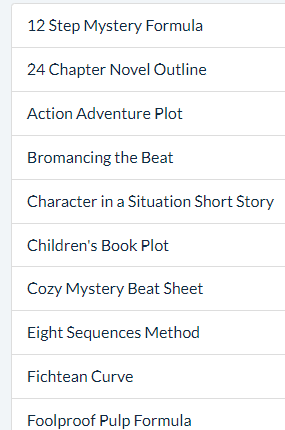


NOTE: These do NOT write the story for you, nor do they use any AI to generate ANY of your story content for you! (Thank goodness.) They simply utilize existing, well-known plot structure frameworks to generate a pre-structured timeline for you to start from. All the beats and scene cards are filled with educational explanations of what type for thing traditionally happens for that beat or scene within your chosen story structure... It's up to YOU to replace those filler texts with your actual story concepts. But it can definitely be helpful to have those structural beats as brainstorming tools!
Here's what it looks like if you actually click "Create New Project" from one of these structure templates:

You'll get a basic timeline generated (it would also be viewable as an Outline if you clicked that tab).

And when you hover over any of the boxes in the prefab timeline, you'll get an explanation of what generally occurs in that beat.

Are you a Panster? Not to worry! You could easily use these Templates after drafting your story, as a checkpoint for whether your pacing generally fits what readers would expect, and to ensure you’re not missing any vital story sections.
Plottr has worked really well for my brain, and it definitely deserved to be added to my Software Review series here on the blog.
If you’d like to see a slightly rambling video of Plottr in action, you can also check out this detailed video I made highlighting how I personally use Plottr to brainstorm and plan complicated story worlds and complex storylines, from back in 2023… though they’ve expanded and improved the software even more since then!
So, what does Plottr cost? Well, as I said, it’s not free… but it is very affordable, and it does have a FREE 30-day trial!
In my opinion, it’s worth giving Plottr a try for those 30 days to see if it works as well for you as it has for me.
The current (as of September 2026) regular prices for Plottr are:
$60/year (or a $150 Lifetime option)--and this basic version of Plottr is the one I use!
Plottr Pro (which has collaboration capabilities) for $9.99/mo, $99/yr, or $599 Lifetime…
Or a higher Plottr Pro + Community tier which gives access to their Discord community and their “Education Vault.”
For me, the basic tier does everything I need (I’m not currently interested in using it collaboratively, as I have other tools for collaboration).
There are only a handful of writing tools I pay for monthly or annually, and Plottr is one of them.
In fact, I liked Plottr so much that I requested to become an affiliate a while back, as I mentioned earlier.
If you decide to purchase Plottr, please use my affiliate link so I'll get a small commission for referring you (it doesn't cost you anything extra!):
I am NOT in the habit of promoting software simply for the affiliate bonuses… quite to the contrary. I was honestly using this tool long before I ever became an affiliate, and it has helped my process greatly.
It really is worth checking out.
If you do, come back here and let me know what you think!
***
Want to explore some more software options? Coming soon is a post on an up-and-coming new software I've been asked to review... Plot Forge! I look forward to getting that review out to you as soon as possible!


Comments